質問 71
Refer to the exhibit.
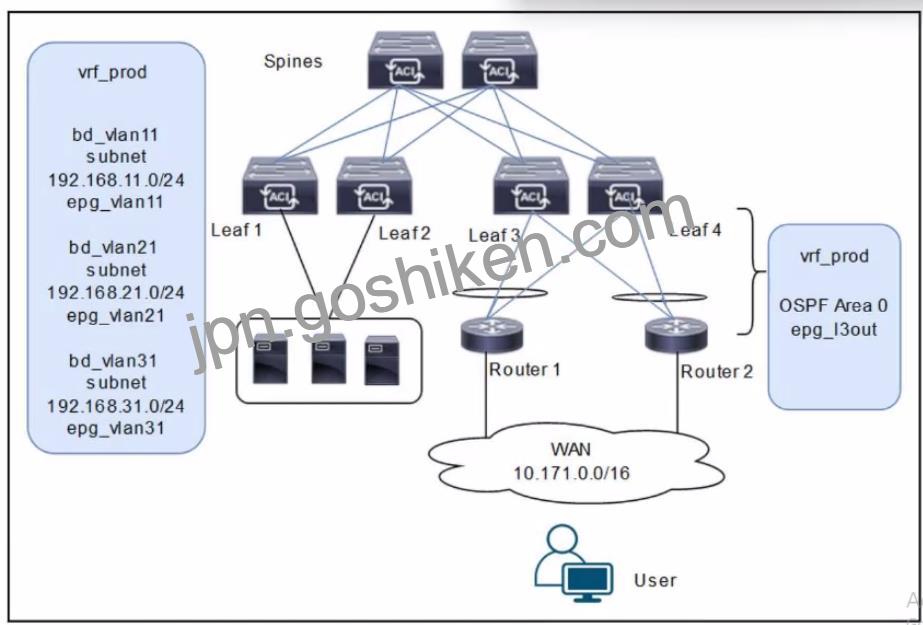
A customer is deploying a WAN with these requirements: *Routers 1 and 2 must receive only routes 192.168.11.0/24 and 192.168.21.0724 from the Cisco ACI fabric *Reachability to the WAN users must be permitted only for the servers that are located in vrf_prod.
Which settings must be configured to meet these objectives?
The scenario involves deploying a WAN with Cisco ACI, where Routers 1 and 2 (connected via an L3Out with OSPF Area 0) must receive specific routes (192.168.11.0/24 and 192.168.21.0/24) from the ACI fabric, and reachability to WAN users must be permitted only for servers in vrf_prod. The diagram shows three bridge domains (bd_vlan11, bd_vlan21, bd_vlan31) with their respective subnets and EPGs, all under vrf_prod, along with an L3Out (epg_l3out) for WAN connectivity.
Requirement Analysis
Routers 1 and 2 must receive only routes 192.168.11.0/24 and 192.168.21.0/24:
These subnets belong to bd_vlan11 and bd_vlan21, respectively. To advertise these routes to Routers 1 and 2 via the L3Out, they must be marked with the appropriate scope in the bridge domain configuration.
In ACI, the “Advertised Externally” scope on a subnet ensures that it is advertised to external routers via the L3Out routing protocol (OSPF in this case).
Reachability to WAN users must be permitted only for servers in vrf_prod:
This implies that only the subnets in vrf_prod (192.168.11.0/24, 192.168.21.0/24, and 192.168.31.0/24) should be accessible, but WAN users should only reach specific subnets based on policy.
The external EPG (epg_l3out) represents the WAN users (10.171.0.0/16), and its subnet scope must control inbound reachability.
The subnet 192.168.31.0/24 (bd_vlan31) should not be advertised to the WAN, as it is not listed in the routes Routers 1 and 2 should receive.
Option Evaluation
A . Configure the subnets 192.168.11.0/24 and 192.168.21.0/24 as Private to VRF. Configure the subnet 192.168.31.0/24 as Advertised Externally. Configure an EPG subnet 0.0.0.0/0 as External Subnets for External EPG:
Setting 192.168.11.0/24 and 192.168.21.0/24 as “Private to VRF” means they are not advertised externally, which fails the requirement for Routers 1 and 2 to receive these routes.
Setting 192.168.31.0/24 as “Advertised Externally” incorrectly advertises this subnet to the WAN, which is not desired.
The “External Subnets for External EPG” scope on 0.0.0.0/0 allows WAN users to reach all subnets in vrf_prod, which is correct for reachability.
Conclusion: Fails the first requirement (route advertisement).
Reference:
B . Configure the subnets 192.168.11.0/24 and 192.168.21.0/24 as Private to VRF. Configure the subnet 192.168.31.0/24 as Advertised Externally. Configure an EPG subnet 0.0.0.0/0 as Shared Route Control Subnet:
Similar to Option A, setting 192.168.11.0/24 and 192.168.21.0/24 as “Private to VRF” prevents their advertisement to the WAN, failing the first requirement.
Setting 192.168.31.0/24 as “Advertised Externally” incorrectly advertises this subnet.
The “Shared Route Control Subnet” scope allows route leaking between VRFs, which is irrelevant here since there is only one VRF (vrf_prod) and no route leaking is required.
Conclusion: Fails both requirements (route advertisement and reachability control).
C . Configure the subnets 192.168.11.0/24 and 192.168.21.0/24 as Advertised Externally. Configure the subnet 192.168.31.0/24 as Private to VRF. Configure an EPG subnet 0.0.0.0/0 as Shared Route Control Subnet:
Setting 192.168.11.0/24 and 192.168.21.0/24 as “Advertised Externally” ensures these subnets are advertised to Routers 1 and 2 via OSPF, meeting the first requirement.
Setting 192.168.31.0/24 as “Private to VRF” prevents its advertisement to the WAN, which aligns with the requirement since only 192.168.11.0/24 and 192.168.21.0/24 should be advertised.
The “Shared Route Control Subnet” scope on 0.0.0.0/0 in the external EPG is incorrect for controlling reachability. This scope is used for route leaking, not for defining which subnets are accessible from the external EPG.
Conclusion: Meets the first requirement but fails the second (reachability control).
D . Configure the subnets 192.168.11.0/24 and 192.168.21.0/24 as Advertised Externally. Configure the subnet 192.168.31.0/24 as Private to VRF. Configure an EPG subnet 0.0.0.0/0 as External Subnets for External EPG:
Setting 192.168.11.0/24 and 192.168.21.0/24 as “Advertised Externally” ensures these subnets are advertised to Routers 1 and 2 via OSPF, meeting the first requirement.
Setting 192.168.31.0/24 as “Private to VRF” prevents its advertisement to the WAN, which is correct since only the specified subnets should be advertised.
The “External Subnets for External EPG” scope on 0.0.0.0/0 in the external EPG (epg_l3out) allows WAN users (10.171.0.0/16) to reach all subnets in vrf_prod, which includes 192.168.11.0/24, 192.168.21.0/24, and 192.168.31.0/24. This satisfies the second requirement, as servers in vrf_prod are accessible, and contracts can further restrict access if needed (though not specified in the question).
Conclusion: Meets both requirements (route advertisement and reachability).
Final Answer Justification
D is correct because:
It ensures that only 192.168.11.0/24 and 192.168.21.0/24 are advertised to Routers 1 and 2 by setting their scope to “Advertised Externally.” It keeps 192.168.31.0/24 private to vrf_prod by setting its scope to “Private to VRF.” It allows WAN users to reach all vrf_prod subnets (including servers) by setting 0.0.0.0/0 as “External Subnets for External EPG,” fulfilling the reachability requirement.
Primary Cisco Reference:
Cisco APIC Layer 3 Configuration Guide, “Configuring Subnets for L3Out.” Cisco ACI Routing and Forwarding Guide, “External EPG and Subnet Scopes.” Cisco ACI Best Practices, “Controlling Route Advertisement and Reachability.”
質問 74
When the subnet is configured on a bridge domain, on which physical devices is the gateway IP address configured?
Reference:
https://www.cisco.com/c/en/us/td/docs/switches/datacenter/aci/apic/sw/1-x/Operating_ACI/guide/b_Cisco_Operating_ACI/b_Cisco_Operating_ACI_chapter_0111.html