質問 94
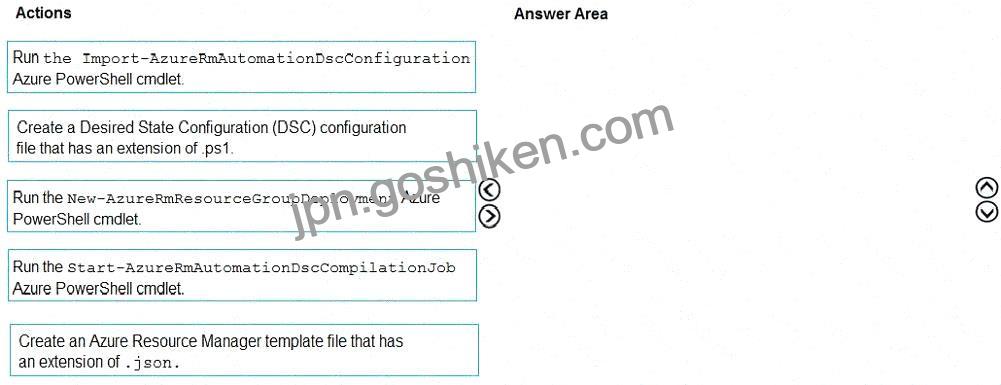
You need to configure Azure Automation for the computer in Group7.
Which three actions should you perform in sequence? To answer, move the appropriate actions from the list of actions to the answer area and arrange them in the correct order.
Explanation:
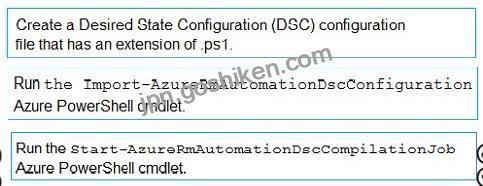
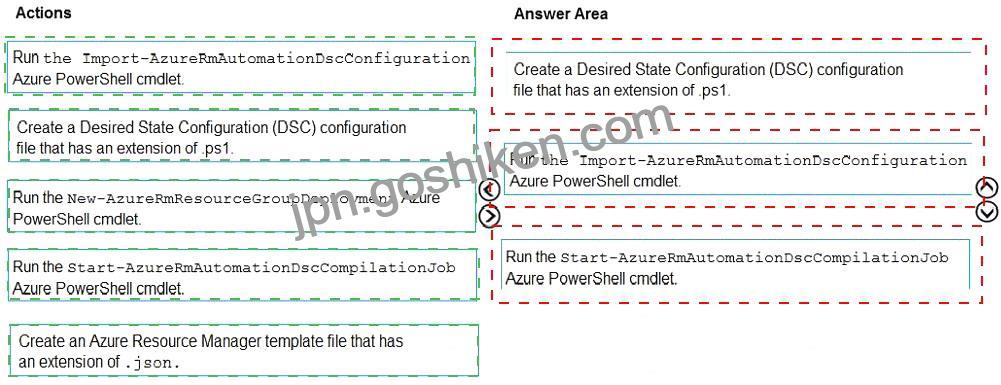
Step 1: Create a Desired State Configuration (DSC) configuration file that has an extension of .ps1.
Step 2: Run the Import-AzureRmAutomationDscConfiguration Azure Powershell cmdlet The Import-AzureRmAutomationDscConfiguration cmdlet imports an APS Desired State Configuration (DSC) configuration into Azure Automation. Specify the path of an APS script that contains a single DSC configuration.
Example:
PS C:\ > Import-AzureRmAutomationDscConfiguration -AutomationAccountName ” Contoso17 ” – ResourceGroupName ” ResourceGroup01 ” -SourcePath ” C:\DSC\client.ps1 ” -Force This command imports the DSC configuration in the file named client.ps1 into the Automation account named Contoso17. The command specifies the Force parameter. If there is an existing DSC configuration, this command replaces it.
Step 3: Run the Start-AzureRmAutomationDscCompilationJob Azure Powershell cmdlet The Start-AzureRmAutomationDscCompilationJob cmdlet compiles an APS Desired State Configuration (DSC) configuration in Azure Automation.
References:
https://docs.microsoft. com/en-us/powershell/ module/azure rm.automa tion/import-azurermautomat iondscconfiguration
https://docs.microsoft.com/en-us/powers hell/module/azurerm.automation/start-azurermautomationdsccompilation job
Topic 3, Woodgrove bank
This is a case study. Case studies are not timed separately. You can use as much exam time as you would like to complete each case. However, there may be additional case studies and sections on this exam. You must manage your time to ensure that you are able to complete all questions included on this exam in the time provided.
To answer the questions included in a case study, you will need to reference information that is provided in the case study. Case studies might contain exhibits and other resources that provide more information about the scenario that is described in the case study. Each question is independent of the other questions in this case study.
At the end of this case study, a review screen will appear. This screen allows you to review your answers and to make changes before you move to the next section of the exam. After you begin a new section, you cannot return to this section.
To start the case study
To display the first question in this case study, click the Next button. Use the buttons in the left pane to explore the content of the case study before you answer the questions. Clicking these buttons displays information such as business requirements, existing environment, and problem statements. If the case study has an All Information tab, note that the information displayed is identical to the information displayed on the subsequent tabs. When you are ready to answer a question, click the Question button to return to the question.
Overview
General Overview
Woodgrove Bank is a financial services company that has a main office in the United Kingdom.
Technical Requirements and Planned Changes
Planned Changes
Woodgrove Bank plans to implement the following project management changes:
* Implement Azure DevOps for project tracking.
* Centralize source code control in private GitHub repositories.
* Implement Azure Pipelines for build pipelines and release pipelines.
Woodgrove Bank plans to implement the following changes to the identity environment:
* Deploy an Azure AD tenant named woodgrovebank.com.
* Sync the Active Directory domain to Azure AD.
* Configure App1 to use a service principal.
* Integrate GitHub with Azure AD.
Woodgrove Bank plans to implement the following changes to the core apps:
* Migrate App1 to ASP.NET Core.
* Integrate Azure Pipelines and the third-party build tool used to develop App2.
Woodgrove Bank plans to implement the following changes to the DevOps environment:
* Deploy App1 to Azure App Service.
* Implement source control for the DB1 schema.
* Migrate all the source code from TFS1 to GitHub.
* Deploy App2 to an Azure virtual machine named VM1.
* Merge the POC branch into the GitHub default branch.
* Implement an Azure DevOps dashboard for stakeholders to monitor development progress.
Technical Requirements
Woodgrove Bank identifies the following technical requirements:
* The initial databases for new environments must contain both schema and reference data.
* An Azure Monitor alert for VM1 must be configured to meet the following requirements:
* Be triggered when average CPU usage exceeds 80 percent for 15 minutes.
* Calculate CPU usage averages once every minute.
The commit history of the POC branch must replace the history of the default branch.
The Azure DevOps dashboard must display the metrics shown in the following table.
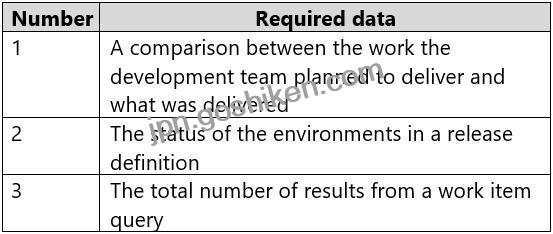
* Access to Azure DevOps must be restricted to specific IP addresses.
* Page load times for App1 must be captured and monitored.
* Administrative effort must be minimized.