115、What is the difference between EPP and EDR?
EPP and EDR are two types of endpoint security solutions that have different goals and capabilities. EPP stands for endpoint protection platform, which is a suite of technologies that work together to prevent, detect, and remediate security threats on endpoints. EPP solutions use techniques such as antivirus, firewall, application control, and patch management to block known and unknown malware and malicious activity.
EDR stands for endpoint detection and response, which is a solution that provides real-time visibility into endpoint activities and enables security teams to detect, investigate, and respond to advanced threats that may have bypassed EPP defenses. EDR solutions use techniques such as behavioral analysis, threat intelligence, and incident response to flag offending files at the first sign of malicious behavior, contain and isolate compromised endpoints, and remediate the damage caused by the attack. Therefore, the correct answer is D, as having an EDR solution gives an engineer the capability to flag offending files at the first sign of malicious behavior. The other options are incorrect because:
* A is false, as EPP focuses primarily on threats that have evaded front-line defenses that entered the environment, not EDR.
* B is false, as having an EPP solution allows an engineer to detect, investigate, and remediate modern threats, not EDR.
* C is false, as EDR focuses on detection and response at the endpoint level, not prevention at the perimeter. References:
* EPP vs. EDR: Why You Need Both – CrowdStrike
* EDR vs EPP: What is the Difference? – Exabeam
* EPP vs. EDR: What Matters More, Prevention or Response? – Cynet
116、What are two benefits of Flexible NetFlow records? (Choose two)
NetFlow is typically used for several key customer applications, including the following: … Billing and accounting. NetFlow data provides fine-grained metering (for instance, flow data includes details such as IP addresses, packet and byte counts, time stamps, type of service (ToS), and application ports) for highly flexible and detailed resource utilization accounting. Service providers may use the information for billing based on time of day, bandwidth usage, application usage, quality of service, and so on. Enterprise customers may use the information for departmental charge back or cost allocation for resource utilization. Reference: https://www.cisco.com/c/en/us/td/docs/ios-xml/ios/fnetflow/configuration/15-mt/fnf-15-mt-book/fnffnetflow.html If the predefined Flexible NetFlow records are not suitable for your traffic requirements, you can create a userdefined (custom) record using the Flexible NetFlow collect and match commands. Before you can create a customized record, you must decide the criteria that you are going to use for the key and nonkey fields. Reference: https://www.cisco.com/en/US/docs/ios/fnetflow/configuration/guide/ cust_fnflow_rec_mon_external_docbase_0900e4b18055d0d2_4container_external_docbase_0900e4b181b413 d9.html#wp1057997 Note: Traditional NetFlow allows us to monitor from Layer 2 to 4 but Flexible NetFlow goes beyond these layers.
…
Billing and accounting. NetFlow data provides fine-grained metering (for instance, flow data includes details such as IP addresses, packet and byte counts, time stamps, type of service (ToS), and application ports) for highly flexible and detailed resource utilization accounting. Service providers may use the information for billing based on time of day, bandwidth usage, application usage, quality of service, and so on. Enterprise customers may use the information for departmental charge back or cost allocation for resource utilization.
Reference:
If the predefined Flexible NetFlow records are not suitable for your traffic requirements, you can create a userdefined (custom) record using the Flexible NetFlow collect and match commands. Before you can create a customized record, you must decide the criteria that you are going to use for the key and nonkey fields.
cust_fnflow_rec_mon_external_docbase_0900e4b18055d0d2_4container_external_docbase_0900e4b181b413 d9.html#wp1057997 Note: Traditional NetFlow allows us to monitor from Layer 2 to 4 but Flexible NetFlow goes beyond these NetFlow is typically used for several key customer applications, including the following: … Billing and accounting. NetFlow data provides fine-grained metering (for instance, flow data includes details such as IP addresses, packet and byte counts, time stamps, type of service (ToS), and application ports) for highly flexible and detailed resource utilization accounting. Service providers may use the information for billing based on time of day, bandwidth usage, application usage, quality of service, and so on. Enterprise customers may use the information for departmental charge back or cost allocation for resource utilization. Reference: https://www.cisco.com/c/en/us/td/docs/ios-xml/ios/fnetflow/configuration/15-mt/fnf-15-mt-book/fnffnetflow.html If the predefined Flexible NetFlow records are not suitable for your traffic requirements, you can create a userdefined (custom) record using the Flexible NetFlow collect and match commands. Before you can create a customized record, you must decide the criteria that you are going to use for the key and nonkey fields. Reference: https://www.cisco.com/en/US/docs/ios/fnetflow/configuration/guide/ cust_fnflow_rec_mon_external_docbase_0900e4b18055d0d2_4container_external_docbase_0900e4b181b413 d9.html#wp1057997 Note: Traditional NetFlow allows us to monitor from Layer 2 to 4 but Flexible NetFlow goes beyond these layers.
117、What is the function of SDN southbound API protocols?
Southbound APIs enable SDN controllers to dynamically make changes based on real-time demands and scalability needs. Reference: https://www.ciscopress.com/articles/article.asp?p=3004581&seqNum=2 scalability needs.
Southbound APIs enable SDN controllers to dynamically make changes based on real-time demands and scalability needs. Reference: https://www.ciscopress.com/articles/article.asp?p=3004581&seqNum=2
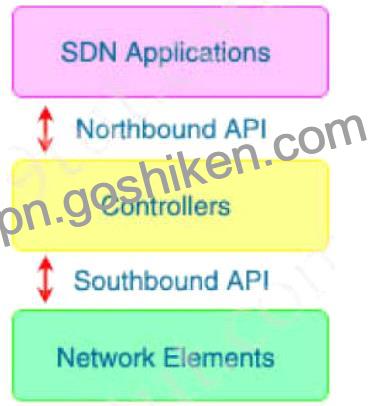
Note: Southbound APIs helps us communicate with data plane (not control plane) applications
121、What are two ways a network administrator transparently identifies users using Active Directory on the Cisco WSA? (Choose two.)
A network administrator can transparently identify users using Active Directory on the Cisco WSA in two ways:
* Create NTLM or Kerberos authentication realm and enable transparent user identification. This option allows the WSA to use the NTLM or Kerberos protocol to authenticate users without prompting them for credentials. The WSA must join the Active Directory domain and have a valid service principal name (SPN) for this option to work1.
* Deploy a separate Active Directory agent such as Cisco Context Directory Agent (CDA). This option allows the WSA to receive user-to-IP mappings from the CDA, which monitors the Active Directory domain controllers for user logon events. The CDA must be installed on a Windows server and have access to the domain controllers and the WSA2.
The other options are not ways to transparently identify users using Active Directory on the Cisco WSA.
Creating an LDAP authentication realm and disabling transparent user identification will require users to enter their credentials manually. Installing the eDirectory client on each client workstation or deploying a separate eDirectory server are not related to Active Directory, but to Novell eDirectory, which is a different directory service3.
References := 1: User Guide for AsyncOS 11.0 for Cisco Web Security Appliances, Chapter: Acquire End- User Credentials, Topic: Active Directory/Kerberos, page 4-3. 2: User Guide for AsyncOS 11.0 for Cisco Web Security Appliances, Chapter: Acquire End-User Credentials, Topic: Active Directory Agent, page 4-
5. 3: User Guide for AsyncOS 11.0 for Cisco Web Security Appliances, Chapter: Acquire End-User Credentials, Topic: eDirectory, page 4-8.